What a sustainability management system is and why it matters
- Introduction
- How to Access Certification Setup
- How to complete certification setup in B Impact
- What happens after Certification setup?
Introduction
Setup is the experience in B Impact that sits between registering your company and working on your self‑assessment.
If you are pursuing certification, certification setup will guide you through a short, personalised questionnaire. By completing it, you provide core information about your company so that B Lab can:
Check whether you meet baseline eligibility for B Corp Certification (Foundation Requirements 1.1).
Determine which legal entities and sites are to be included in your certification scope
Identify which entities must meet the B Corp legal requirement
- Confirm your company’s track based on its size, sector, and market in order to generate a customized self-assessment
How to Access Certification Setup
Go to the B Impact homepage and click on "Start Now" in the "Get ready for the new standards!" section. You will then be redirected to the Certification setup page.
You can also access Certification setup by clicking on the “Interested in becoming a Certified B Corp?” section or through the left-handed menu.
How to complete certification setup in B Impact
Certification setup is organised into four sections that you can see on your setup dashboard:
Section 1) Gather company documents:
First, assign a "Primary contact" – only users with the “admin” role from your Team Members can be assigned as a Primary contact. This person will be the main point of contact for certification-related information and updates – for example, during the audit stage, your assurance provider will send communications to the primary contact selected here. You can edit this contact any time up until you submit your assessment for audit. | 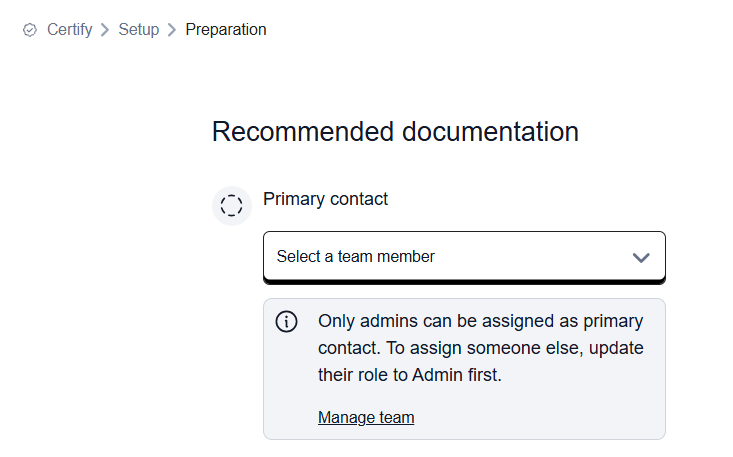 |
Then, confirm that you have gathered or can access all documents needed to complete all certification setup sections, such as:
- Articles of incorporation, charter, business registration certificate, or corporate governance articles
- Organizational chart or ownership records
- Profit and loss statement or tax statement
- Human Resources (HR) records or employee roster
At this stage, you will not be asked to upload any documentation.
Section 2) Eligibility: Organization type
Use this section to determine if your company meets baseline eligibility criteria for B Corp Certification (FR1.1). You can expect to answer questions about:
- Your company’s ownership type
- Whether your company has been operational for at least the last 12 months (see the article Operational Date Explained).
- Whether your company operates as a for-profit business in a competitive market.
You can expect the one of the following outcomes:
- Preliminary eligibility for B Corp Certification met*: Your company is eligible to continue to Section 3 of Certification setup. *A company may engage in additional practices that make it ineligible for certification. These issues will be addressed in the Foundation Requirement 1.2.
- Ineligible for B Corp Certification: Your company can continue to Section 4 of Certification to use B Impact as a free tool to measure your impact.
Section 3) Scoping: Related entities
This section unlocks only if your company meets baseline eligibility criteria in Section 2.
The purpose of this section is to collect information about your company’s organizational structure so that you know which entities in your organization need to be included when completing the assessment and meeting the legal requirement.
B Lab applies scoping rules to accurately assess the boundaries of your company’s assessment. For more details, see What to know about scoping your company for certification.
You can expect to answer questions about:
- Ownership: Select the ownership type of your company. This determines the sequence of questions regarding parent companies and owners.
- Parent companies and owners: If your company is not independently owned, determine whether any parent entity is required to be in scope and complete the B Corp legal requirement.
- Subsidiaries: Determine whether subsidiary entities are required to be in scope and complete the legal requirement. Include the following subsidiary types:
- Wholly-owned: a company whose common stock is 99-100% owned by your company.
- Majority-owned: a company whose common stock is 51% to 98% owned by your company.
- Joint venture: a company whose common stock is 50% owned by your company.
- Controlled: a company over which your company has authority, either by controlling its leadership or by being directly involved in its day-to-day operations and decision-making, including the ability to direct or manage its business activities. This could show up as financial control (e.g., your company is financially consolidated with the entity) or managerial control (e.g., your company's executive team makes decisions over the entity).
- Other related entities: Identify if your company shares any other aspect of business with other entities, which may include operations, workers, executives, facilities, name, brand, or ownership.
- Executive authority: Confirm if your company’s executive team has decision-making authority over the Sustainability Management System of the entities listed, and is able to address any non-conformities related to their policies and practices (e.g., human rights, fair labor practices, purpose-driven strategy and governance, environmental management, and climate action).
For more details, see What to know about the Scoping: Related entities section in the certification setup.
Section 4) Scoping: Customize your assessment
This section unlocks after Section 3 is complete, or when Section 3 does not apply (for example, if you do not meet baseline eligibility for certification in Section 2 but still want to generate a self-assessment for impact measurement purposes only).
While Section 3) Scoping: Related entities determines which entities need to be included in assessment, Section 4) Scoping: Customize your assessment gives your company the most appropriate version of the assessment for all entities required to pursue certification. The questions in this section are used to determine the size, sector, industry and location of your company to generate an assessment specifically customized for your company.
For more details, see What to know about Scoping: Customizing your Assessment.
What happens after Certification setup?
After completing all sections, you must click "Complete Section" for each section and then click “Submit setup".
|   |
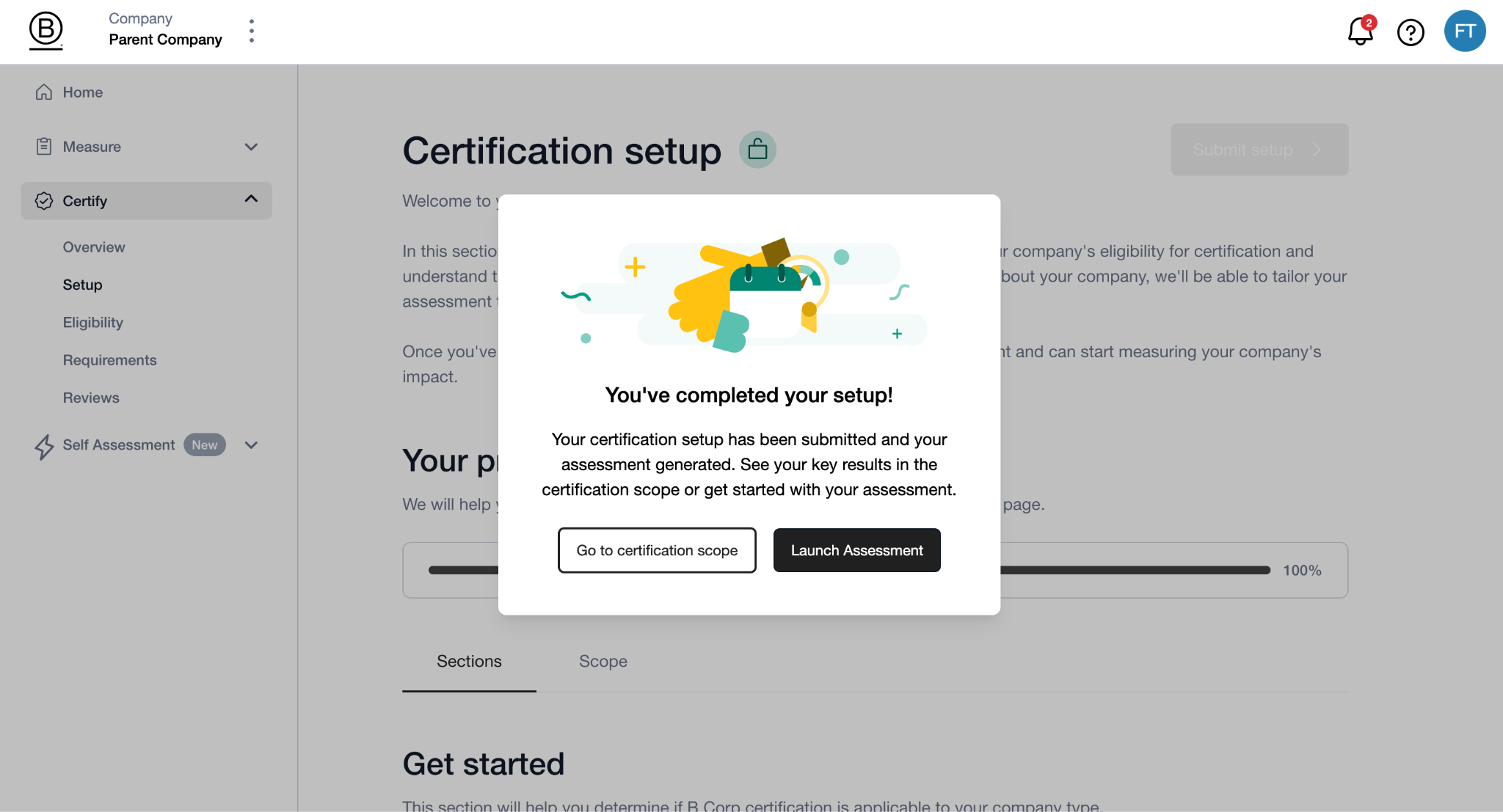
Once you submit your Certification setup, a Certification scope summary outlining your company’s scope and track is generated in the Scope tab, sumarizing the results from Sections 3 and 4.
Your Certification scope summary is the foundation of your B Corp Certification, and determines important aspects of the process such as audit activities and fees. For more details on finding and understanding your Certification scope summary, see Understanding your Certification Scope in B Impact.

Was this article helpful?
That’s Great!
Thank you for your feedback
Sorry! We couldn't be helpful
Thank you for your feedback
Feedback sent
We appreciate your effort and will try to fix the article