- How to fill in the template
- Tab 0: Instructions
- Tab 1: Managerial Structure & Management System
- Tab 2: Legal Org Chart
- Tab 3: Legal Entities and Operations
- Tab 4: Financials and Workforce
- Tab 5: List of Sites
- Tab 6: List of Brands
- Submission Process & Next Steps
- Appendix I - Translated Templates
Companies that are too complex to receive an automated decision in Section 3 of Setup (Scoping: Related Entities) see the following result when completing this section: Manual review required.
In such cases, companies must upload a completed Scoping Data Gathering Template and click “Submit for review” so that a member of B Lab can review your company’s information and issue a tailored certification scope following B Lab’s scoping rules.
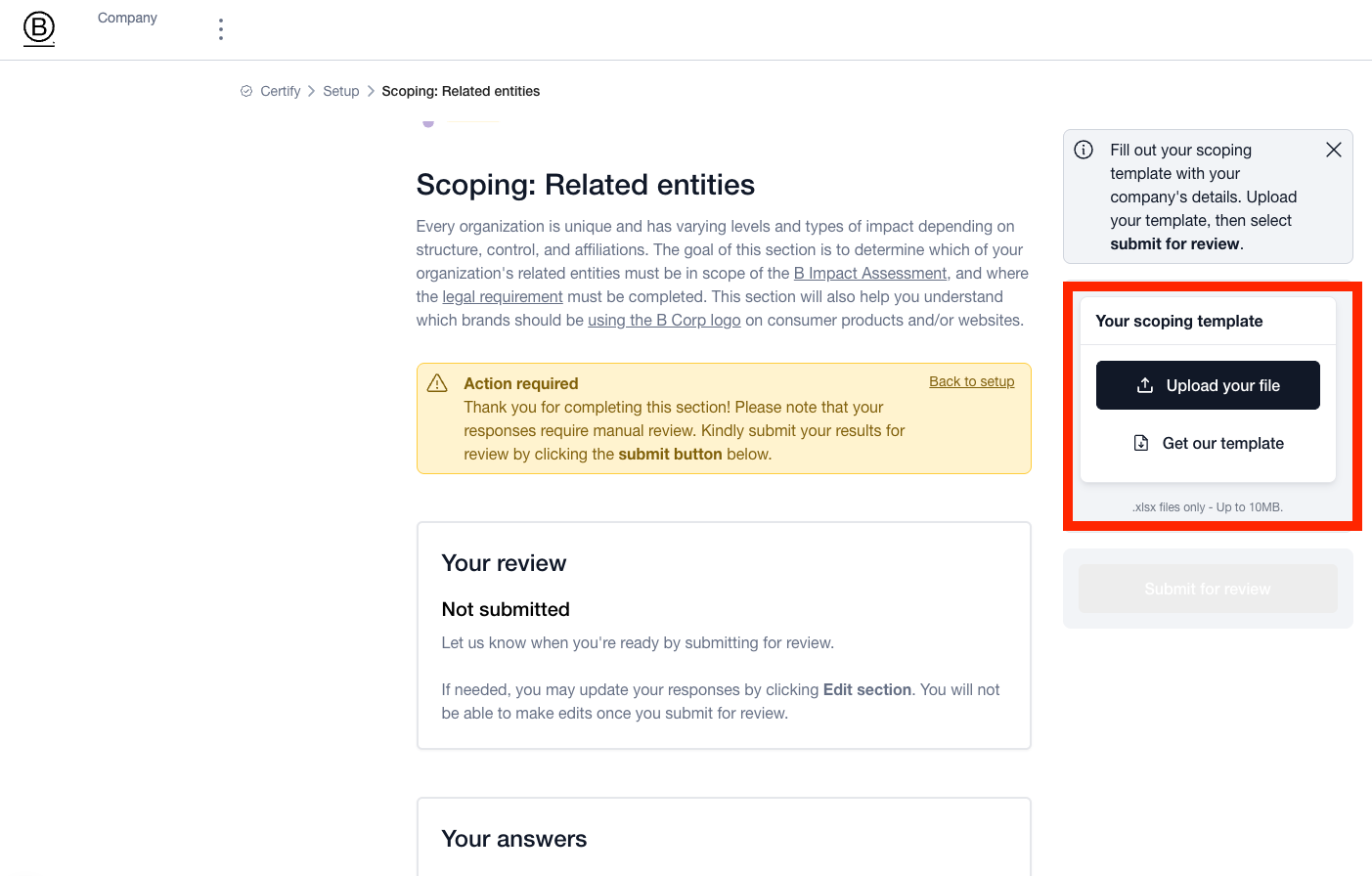
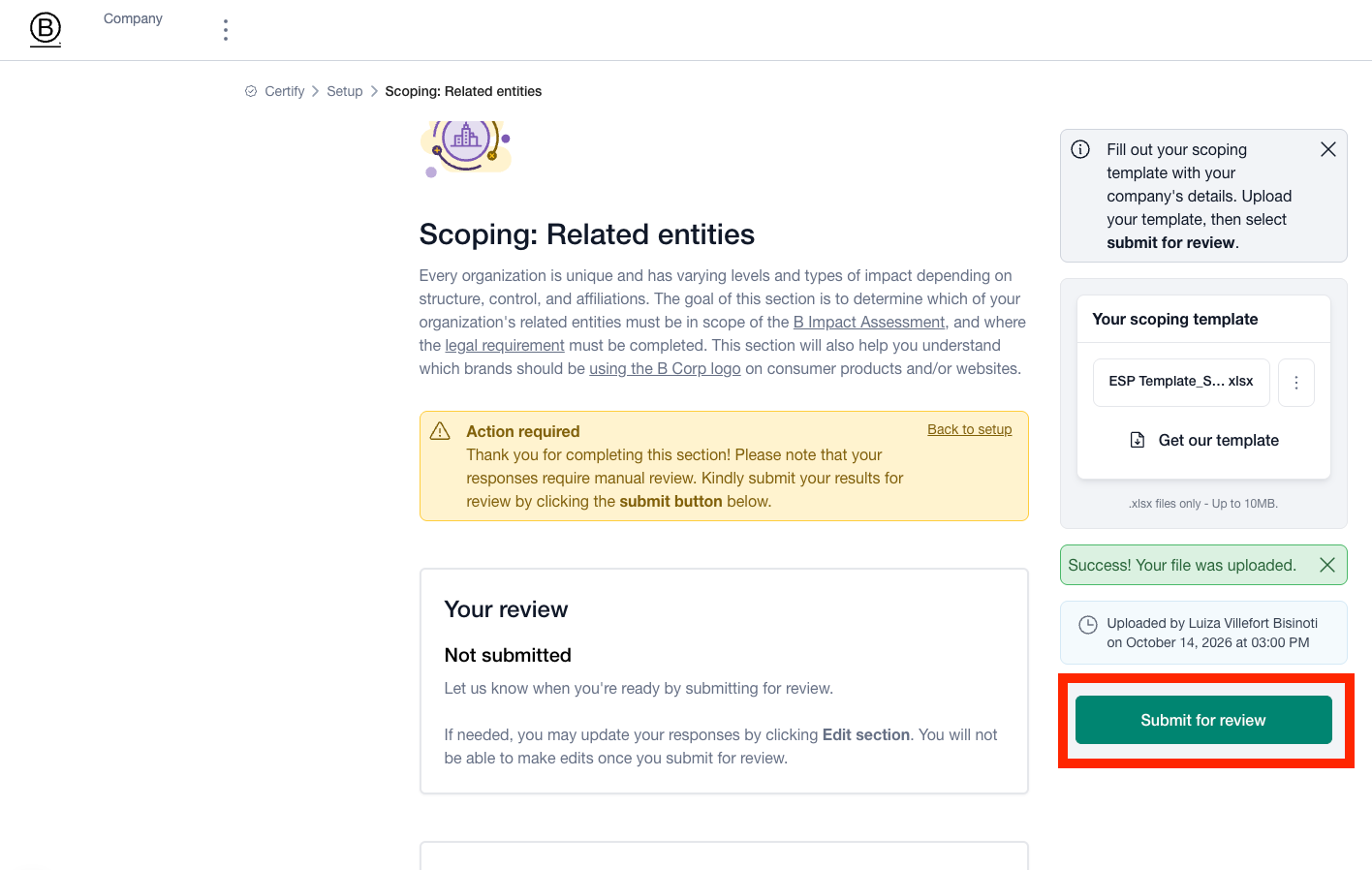
This article provides instructions for completing the Scoping Data Gathering Template accurately. You can find the template in French, Italian, Spanish, Portuguese and Chinese in the Appendix of this article.
How to fill in the template
The Scoping Data Gathering Template contains seven interconnected tabs. Every tab must be completed carefully and comprehensively before uploading the document to Setup.
Tab 0: Instructions
This tab provides a summary of scoping rules and outlines mandatory supporting attachments (e.g., visual legal organizational charts, financial statements). Please review it carefully.
Important notice: Intentionally omitting related entities, operational activities, or affiliated businesses violates B Lab’s Foundational Requirements and may disqualify an applicant.
Tab 1: Managerial Structure & Management System
This is the most critical tab for proving organizational independence.
Section A: Managerial Structure & Qualifying Questions
Paste or link your Managerial Organizational Chart showing key operational heads (Row 10).
Answer the 7 Qualifying Questions (Rows 15 - 21) regarding which specific job roles/functions hold authority over:
Local site stakeholder policies
Group pay, benefits, and working conditions
Central worker data and diversity targets
Supply chain human rights management
Corporate climate strategy and goal-setting
Government affairs and collective policy engagement
Approval Dependencies: Flag if any of these functions require approval from out-of-scope parent executives
Section B: Sustainability Management System (SMS)
A single, unified SMS is required for B Corp Certification. Complete the four preliminary yes or no (Y/N) questions (Rows 35 - 38), then provide two to five sentence written responses for the four core dimensions:
Governance: Describe the level at which sustainability decisions are made. Is there one central team enforcing policy or several independent regional teams?
Objectives & Action Plan: Explain where performance data is collected and targets set. Define where company-wide strategy applies vs. regional practices.
Policies & Procedures: Detail policy consistency across sites. Identify any policies shared with out-of-scope parent or sister entities.
Remediation: Confirm whether your executive team has full authority to correct audit non-conformities without out-of-scope approval.
Tab 2: Legal Org Chart
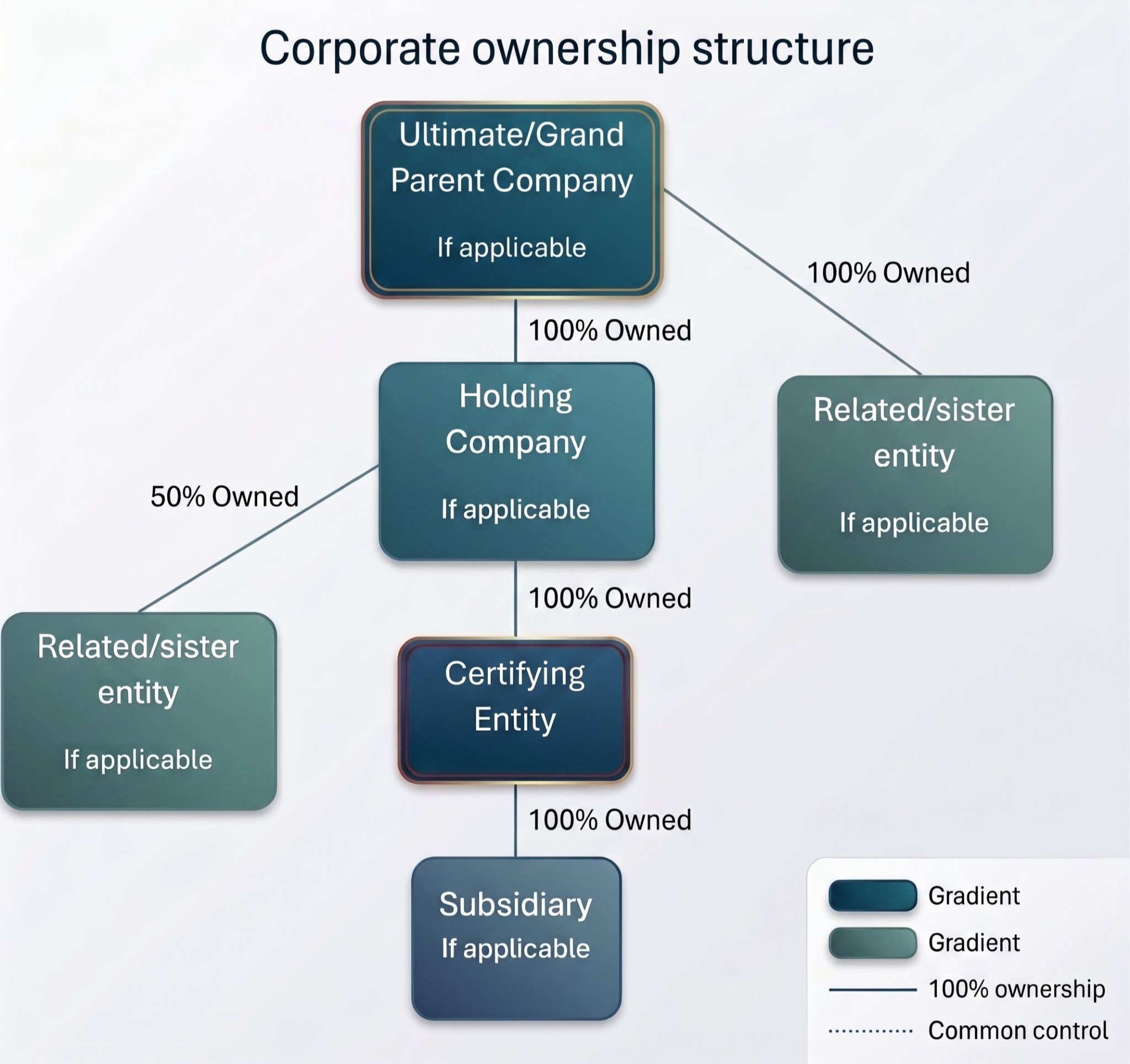
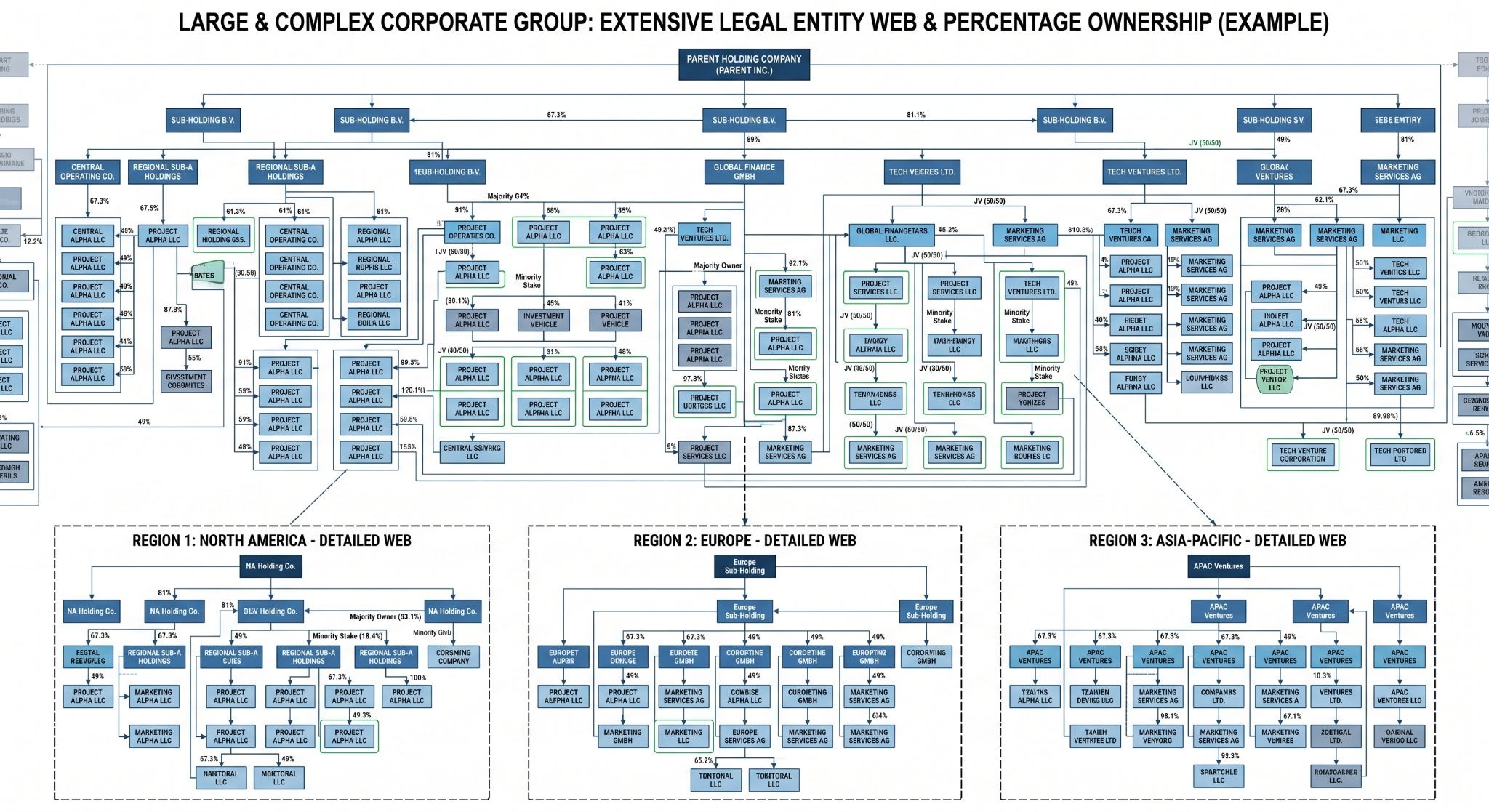
This tab requires the complete picture of the company’s entire legal ownership tree. Paste a high-resolution visual image (Row 8) or enter an accessible link (Row 6) showing your full corporate group structure. The chart must include all parent, intermediary, sibling, subsidiary, and joint venture entities up to the Ultimate Parent Entity, including ownership percentages.
If your corporate group is too big to capture in one image, you can provide various images or parts of your organizational structure, for example by providing a separate org chart visual per region.
Examples:
Tab 3: Legal Entities and Operations
List every single related legal entity – one per row – regardless of whether you want them included in your certification scope. Include parent/holding companies, operating subsidiaries, sibling companies, joint ventures, dormant entities, same-name companies without shared ownership, and businesses sharing operations.
Why this matters: B Corp Certification is a company-level certification. Any entity obtaining certification must be an independent business with all core operational functions in-scope. B Lab does not certify individual departments, site locations, or partial business lines.
B Lab cannot verify the independence of your desired certification scope without analyzing your entire corporate structure of entities affiliated by name, ownership, or shared operations.
By evaluating your complete corporate family tree up to the highest ultimate parent entity, B Lab verifies that the certifying branch is truly distinct, self-governing, and operationally independent.
Tab 4: Financials and Workforce
This tab captures financial revenue and employee headcount across all entities to determine your company's Size on the B Impact Assessment.
Gross Annual Revenue (Column B): Enter annual gross revenue for each entity.
Workforce Categorization (Columns C - H): Split headcount by weekly hours worked (Full-Time 35+ hrs/wk, Part-Time 20 - 34 hrs/wk, Part-Time <20 hrs/wk) and contract duration (>6 months vs. ≤6 months).
Full Time Equivalency & Total Headcount (Columns I & J): These columns are auto-calculated. Do not edit or overwrite the formulas in these columns.
Why this matters: Your verified Full-Time Equivalent (FTE) headcount and revenue directly drive which standards sub-requirements apply to your assessment track. Inaccurately reporting these metrics may result in displaying the wrong sub-requirements and may prevent the company from getting audited.
Tab 5: List of Sites
List every physical location where your company operates or employs staff. For more guidance on listing sites, read How to determine which sites are in scope for certification.
Golden Rule For Sites: 1 Site = 1 Physical Address = 1 Row (Starting on Row 10). There shouldn't be more than one site with the same address.
What to Include:
All owned or leased headquarters, offices, factories, warehouses, retail stores, and distribution centers operated by your company.
Leased Space / Multi-Tenant Buildings: Include these in scope if your staff operates there, even if the building landlord controls utilities or waste management (note that there is limited operational control in the site description).
What Can Be Excluded:
Locations where the applicant exercises zero operational control and has no direct employees (e.g., a counter inside a department store run entirely by department store staff).
Multi-Function Sites:
Sites serving multiple roles (e.g., HQ + warehouse + production) should be classified by their primary function.
Why this matters: Only physical sites officially disclosed and approved on this tab will appear on your B Corp Certificate and be authorized to use B Corp IP.
Tab 6: List of Brands
List all commercial brand names owned or operated by the certifying entity. B Lab enforces strict brand control criteria to protect consumers from misleading claims:
Full Control Over Design & Formulation (Column C): B Corp IP can only be placed on products or services for which your company maintains 100% control over design and formulation.
Licensed, Co-Branded, or Franchised Products (Columns E & F): Products created via licensing or co-branding cannot display B Corp IP unless the external partner/licensor is also B Corp Certified.
Ineligible Industries (Column G): Confirms that brands are not involved in excluded or restricted sectors under B Lab Standards.
Why this matters: Only approved in-scope brands will be authorized to use B Corp IP.
Submission Process & Next Steps
Final Quality Check: Ensure all required cells across all eight tabs are filled out and example rows have been removed. Ensure all entities related by name, ownership or shared operations are listed. Not only the ones you want to include in certification scope - but your whole corporate family.
File Format: Save the document as an Excel workbook (.xlsx). PDF or CSV formats cannot be processed by the portal.
Upload in Portal:
Log into your B Impact account.
Navigate to Setup > Step 3. Scoping: Related Entities > Scoping Data Gathering.
Upload the completed spreadsheet and click Submit for Review.
Scoping Review: A B Lab Scoping Specialist will analyze your submission and reach out via email if additional clarifications are needed.
Launch Assessment: Once Step 3 is marked complete by B Lab, navigate to Setup Step 4 (Scoping: Customize your assessment). Complete this section and select the green Submit Setup button. This unlocks your customized B Impact Assessment tailored to your exact size, sector, and geographic track.
Tip: You can view your finalized, official Scoping Memo at any time during or after setup by clicking the "Scope" tab within the Setup page.
Appendix I - Translated Templates
View and download the template in the languages listed here. Make sure to download as an .XLXS file to access the spreadsheet.
Was this article helpful?
That’s Great!
Thank you for your feedback
Sorry! We couldn't be helpful
Thank you for your feedback
Feedback sent
We appreciate your effort and will try to fix the article