- What is a Variance?
- What is the Variance Request Process?
- When must a Variance Request be made?
- How to submit a Variance Request?
- Who reviews Variance Requests?
- How long does it take to resolve a Variance Request?
- How to know if a Variance has been approved?
- In Summary
- Resources & Further Guidance
What is a variance?
A variance is a formally approved time-bound exception to a B Lab Standard sub-requirement, granted when conformity is impossible due to objective limitations, such as legal, technical, or security infeasibilities.
A variance may be applied to the full company’s certification scope, or only to a specific company site or operational jurisdiction, depending on where the limitation(s) exist(s). This would be considered a partial variance.
Examples of legitimate grounds for variance include, but are not limited to:
Legal infeasibility - local or national laws that prevent a full or partial implementation of a B Lab Standards requirement.
Technical infeasibility - absence of critical physical infrastructure, such as renewable energy providers or waste management facilities in the region.
Security infeasibility - where implementing a requirement would endanger workers, communities, or the confidentiality of sensitive data.
Force majeure events, such as natural disasters, armed conflict, or other emergencies that temporarily prevent compliance.
Variances ensure that genuine limitations do not prevent companies from pursuing certification, while still protecting the integrity of the B Lab Standards.
What is the Variance Request Process?
The Variance Request (VR) process provides a pathway for companies to seek formally approved exceptions to compliance with specific B Lab Standards sub-requirements, when conformity is impossible due to objective limitations, such as legal, technical, or security infeasibilities.
The VR process may also be used to apply the Equity Mechanism (EM) when a company is eligible for it because of operational barriers in the country or territory they are based. For more information about the Equity Mechanism, refer to the articles:
- How are the new B Lab Standards requirements tailored to each company's context?
- FAQs: Equity Mechanism
When must a Variance Request be made?
Variances must be requested during the self-assessment stage of the certification process. Companies must identify the need for a variance while reviewing the standards sub-requirements in the self-assessment, and must submit the variance request before the audit begins.
Under exceptional circumstances, variance requests may be submitted during the corrective action period in order to address a nonconformity identified by the auditor. However, the request must always meet the requirements for requesting a variance, such as legal, technical, or security infeasibilities which objectively limit compliance feasibility with a given standard, or due to eligibility for the Equity Mechanism. Please note that VRs submitted during the corrective action period may delay the audit outcomes.
Before requesting a variance for a sub-requirement, companies must be sure to read the whole text of the sub-requirements, including Compliance Criteria, Clarifying Compliance Criteria and other guidance text to ensure the infeasibility indeed meets the requirements of a variance.
How to submit a Variance Request?
Variance requests are managed through B Lab's designated ticketing system to ensure proper tracking and record-keeping.
Variance requests must be submitted through the Variance Request form where a ticket and tracking mechanism will be generated. If your company qualifies for several variances (such as through the equity mechanism), please log one variance request for each sub-requirement.
Instructions for completing the Variance Request form
To ensure a swift review and resolution of VRs, companies must include clear and accurate information in the following fields of the designated form:
- Email address
- Subject
- Use this format: Company name (as per B Impact) / sub-requirement indicator / type of variance request
- Description
- Please log one request per sub-requirement and upload evidence for objective limitations as an attachment.
- Include a brief problem statement explaining:
- The objective limitation faced by your company; such as legal, technical, or security infeasibilities, or
- Equity mechanism eligibility
- If (i) applies: Indicate and explain relevant sections of the evidence provided which support the objective limitation listed above. If the Variance Request is only applicable to a specific site or jurisdiction, please provide a problem statement and evidence specific to the site or jurisdiction.
- If (i) applies: Include any additional relevant facts about the company’s specific situation or practices.
- Link to the company's B Impact assessment.
Please provide the link to the company's current B Impact assessment
- Name of the Company as per B Impact
- Please provide the company's name as per current B Impact assessment
- Company Size as per B Impact
Please provide the company's size as per current B Impact assessment
- Sector as per B Impact
Indicate company sector as per B Impact
Indicate company industry category as per B Impact
Indicate company industry as per B Impact
- Country in which majority of workers are based
- Please select the country in which the majority of workers are based (as entered in B Impact)
- How would you describe your company's site locations?
Please select the applicable option and read through the definition of ‘Central function’, if option 2 applies:
Option 1: The company's site or sites are located in one country - THIS MEANS Please select the country where the company's site(s) are based
Option 2: Field 1st layer: Multiple sites across multiple countries - THIS MEANS Please select where the company's central function is located [Central function: The entity or site designated to develop & maintain the company’s sustainability management system & to ensure the B Lab Standards requirements are met at all sites within the scope of certification (which may be the HQ or head office).]
Then, select the applicable country from the drop-down menu
- Current Certification Stage
Please indicate which certification stage the company is in (self-assessment or corrective action stage)
- Certification Scope Memo Expiry Date
Indicate the certification scope memo expiry date as listed in the memo
- Variance Request Type
- Please indicate which type of variance request your company qualifies for:
- Equity Mechanism
- Legal
- Technical
- Security
- Other
- Please indicate which type of variance request your company qualifies for:
- Impact Topic
Indicate impact topic, requirement and sub-requirement number
- Sub-Requirement Compliance Year
Select the subrequirement year that your company is working on (i.e. Year 0 if this is your first time on the new certification process)
Select from the following options:
Year 0 subrequirements
Year 3 subrequirements
Year 5 subrequirements
- Is this Variance Request applicable to all company sites or to a specific site or jurisdiction?
Please indicate if it is applicable to all sites and a specific site or jurisdiction.
- If it is specific to a site or jurisdiction, please list the applicable site or jurisdiction.
Please indicate which specific site or jurisdiction the variance applies to. If 'All sites' was selected previously, please include 'n/a' here.
- Attachment
- Attach evidence which confirms the company faces objective limitations (i.e. confirmed by a reputable third party) to compliance with a sub-requirement.
- Attachments up to 20MB can be attached to the submission form. If attachments exceed this limit or several attachments are provided, please share a link to a google drive in the description section, including relevant attachments and provide open access to users with the link.
Who reviews Variance Requests?
Variance requests are reviewed and responded to by B Lab’s Assessment Decisions Committee (ADC) made up of subject matter experts of the B Lab Standards.
How long does it take to resolve a Variance Request?
B Lab will resolve and communicate the outcome of the request within 10 business days. If additional evidence or documentation is needed from the company to support the request, B Lab will request that information within 3 business days of the request being submitted. There is a maximum of two rounds of additional information requests.
If the request cannot be resolved within the agreed upon timeline, or requires escalation, B Lab will inform the company of the updated timeline.
How to know if a Variance has been approved?
B Lab will communicate outcomes of the review via the ticketing system.
Approved variances will be recorded in the company’s B Impact assessment at the relevant sub-requirement via a status update to “Variance Approved” and a comment from B Lab with the variance details.
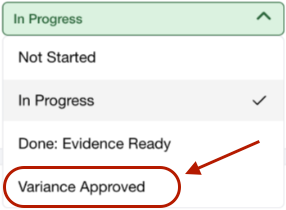
An approved variance means that the company is not required to demonstrate conformity with that specific sub-requirement.
Variances may be issued for a limited period of time. Those limitations will be outlined in the response from B Lab.
An approved variance decision cannot be reversed until the validity period expires.
The approved variance will be communicated to the assurance provider by B Lab.
In Summary
Variances to the application of the B Lab Standards may be requested by companies going through the B Corp Certification process, if they can demonstrate that there are objective limitations, such as legal, technical, or security infeasibilities, which limit their ability to comply with certain sub-requirements of the standards; or for the application of the Equity Mechanism.
Resources & Further Guidance
B Corp Certification Requirements for B Corps, Section 4.2.2 Requesting a Variance
How the new B Lab Standards requirements are tailored to each company's context?
Submit a support ticket if you have further questions.
Was this article helpful?
That’s Great!
Thank you for your feedback
Sorry! We couldn't be helpful
Thank you for your feedback
Feedback sent
We appreciate your effort and will try to fix the article